Cosmos (ATOM)
Cosmos wallet structure
The child address withdrawal wallet of Cosmos has the following structure.
- Main address
- Child address
TIP
Cosmos has a fee address, but it is not used.
Creating child addresses
Call the Create Child Address API to create child addresses. Generally, one child address is assigned to each end user. You can check the created child addresses in [Child Addresses] on the console or by calling the Get Child Address List API.
Response example
[
{
    "address": "cosmos1ps8vuzj37gvtugcgsyww2m855jluzjd6wehve5",
    "name": "test child address"
}
]
Deposit
Deposit status
When assets sent from outside arrive at the main address or a child address, Octet recognizes them as a deposit. When the deposit transaction is included in a block, its status becomes complete (FINALIZED). If assets are sent from outside but do not arrive at the main address or a child address, that transaction is not recognized. Therefore, there is no failed (FAILED) status for deposit transactions.
Checking deposits
1. Checking on the console
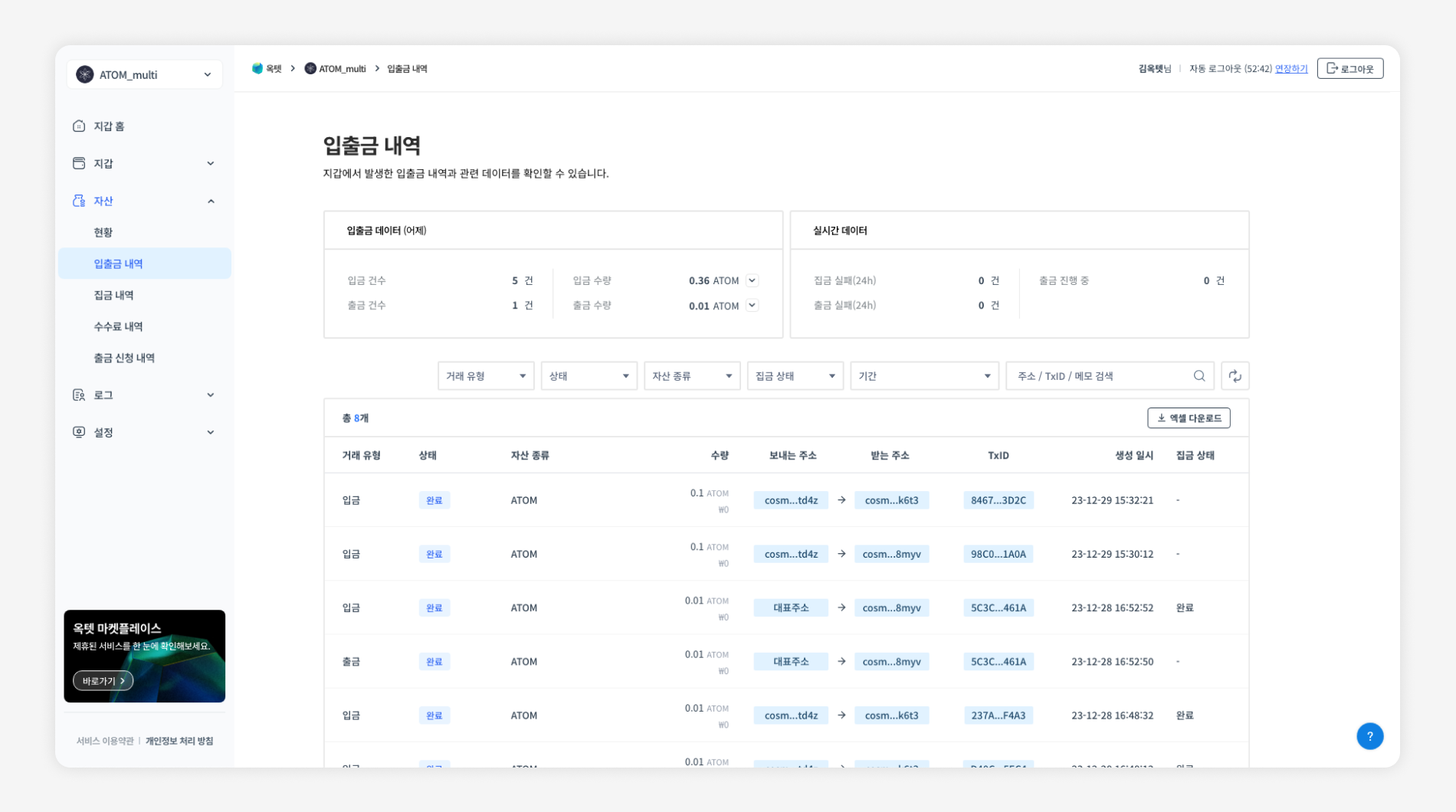
You can check deposits in [Transactions] on the console. Deposits in FINALIZED status are displayed as 'Completed'.
2. Checking with webhooks
When a deposit to the main address or a child address is completed, a deposit webhook is sent. You can check whether the deposit was made from the webhook you received. For how to use webhooks and the format of the data sent, see the Webhook page.
Withdrawal
Withdrawal process
In the child address withdrawal wallet, assets are withdrawn from the main address and child addresses to the outside. The withdrawal fee is deducted from the address being withdrawn from. For example, when withdrawing from 'child address A', the fee is deducted from 'child address A'. Therefore, the address being withdrawn from must hold assets (ATOM) to pay the fee. If the withdrawal fee is insufficient, the withdrawal does not proceed.
- Request a withdrawal.
- A transaction is generated.
- The optimal fee is calculated, and the transaction is propagated.
- The withdrawal is completed when the transaction is included in a block.
Withdrawal status
A withdrawal is treated as complete (FINALIZED) as soon as the transaction is included in a block.
| Status | Description |
|---|---|
PENDING | The withdrawal transaction has been generated |
FINALIZED | The withdrawal transaction is included in a block |
FAILED | The withdrawal transaction failed |
Withdrawing
Call the Request Withdrawal API to request a withdrawal from a child address or the main address to the outside. If the withdrawal request succeeds, a uuid value is returned. You can use this value to check the progress of the withdrawal.
Response example
{
    "uuid": "18012e3f-07f3-45ec-862b-f020c0ca935a"
}
Checking withdrawals
1. Checking on the console
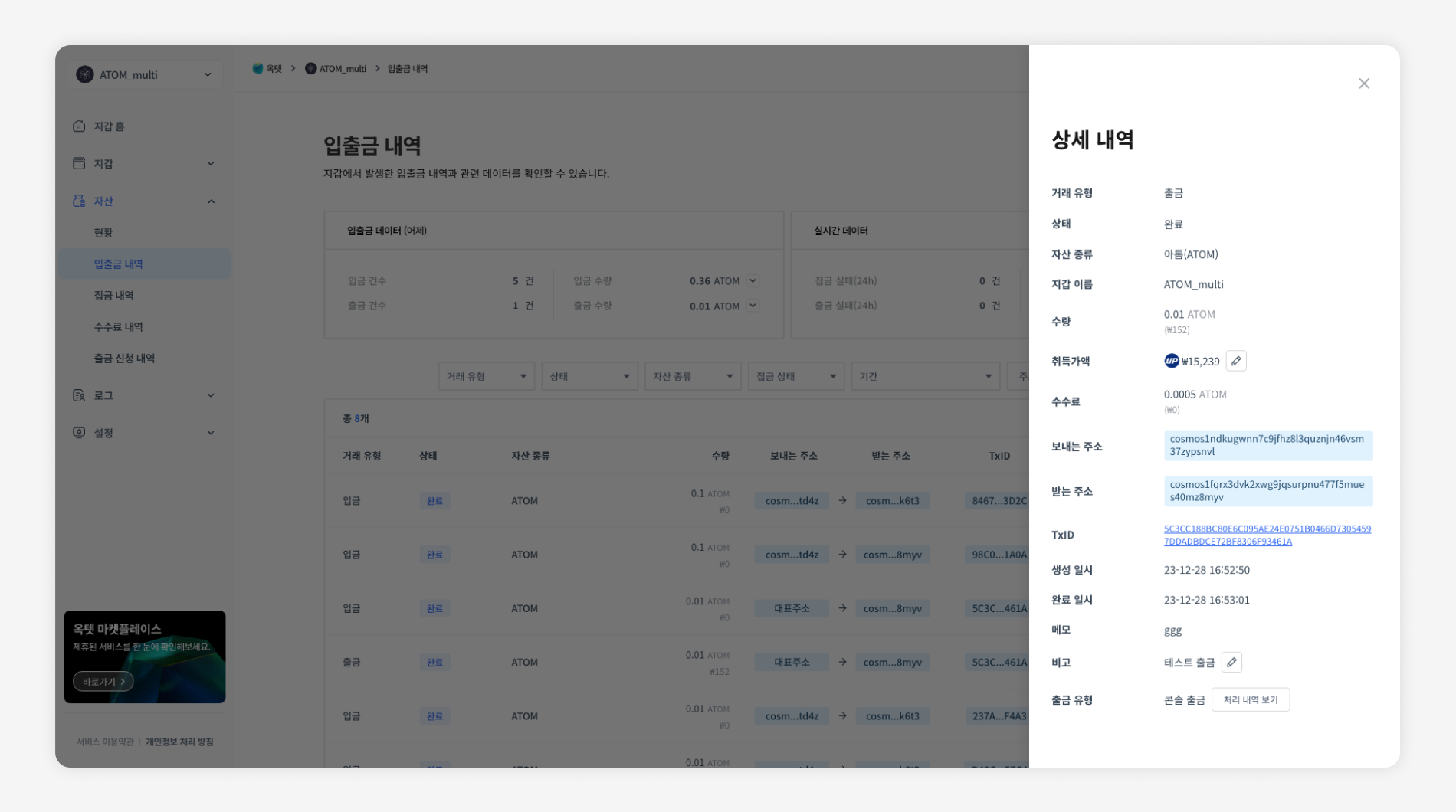
You can check withdrawals in [Transactions] on the console. Withdrawals in AWAITING_WITHDRAWAL or PENDING status are displayed as 'In progress', and withdrawals in FINALIZED status are displayed as 'Completed'.
2. Checking with the API
Call the Get Withdrawal Request Information API to check the progress of a specific withdrawal transaction.
Response example
{
    "idx": 2289775,
    "coin": {
    "idx": 195,
    "symbol": "ATOM",
    "nameKo": "Atom",
    "nameEn": "Atom",
    "status": "ACTIVATED",
    "type": "DEFAULT",
    "contractAddress": "uatom",
    "decimals": 6,
    "createdDate": "2023-12-26T03:54:42.296Z",
    "modifiedDate": "2023-12-26T03:54:42.296Z"
},
    "uuid": "e046710a-877d-44f2-a43f-40e08e25af56",
    "fromAddress": "cosmos1t8ddcfwyzjwqkujzcyhkm0unhq5qyfag9mtd4z",
    "toAddress": "cosmos1fqrx3dvk2xwg9jqsurpnu477f5mues40mz8myv",
    "amount": "0.10000000000000000000",
    "memo": null,
    "requestId": "20231229T162800",
    "type": "API",
    "description": "",
    "requiredApprovalCount": 1,
    "useApiAutoApproval": false,
    "useFeeDelegation": false,
    "feePayerAddress": null,
    "status": "SENT",
    "createdDate": "2023-12-29T06:28:50.012Z",
    "modifiedDate": "2023-12-29T06:30:08.000Z",
    "rejectedDate": null,
    "transaction": {
    "idx": 317057,
    "uuid": "e046710a-877d-44f2-a43f-40e08e25af56",
    "type": "WITHDRAWAL",
    "txid": "98C02770BDE1F0BA1FE83329AFDBFE88503A968DE501C9CB5F8FAD4309C41A0A",
    "fromAddress": "cosmos1t8ddcfwyzjwqkujzcyhkm0unhq5qyfag9mtd4z",
    "toAddress": "cosmos1fqrx3dvk2xwg9jqsurpnu477f5mues40mz8myv",
    "amount": "0.10000000000000000000",
    "usedFee": "0.00050000000000000000",
    "nonce": 5,
    "blockHeight": null,
    "serialized": "0a92010a8f010a1c2f636f736d6f732e62616e6b2e763162657461312e4d736753656e64126f0a2d636f736d6f733174386464636677797a6a77716b756a7a6379686b6d30756e6871357179666167396d7464347a122d636f736d6f7331667172783364766b32787767396a71737572706e7534373766356d75657334306d7a386d79761a0f0a057561746f6d120631303030303012660a500a460a1f2f636f736d6f732e63727970746f2e736563703235366b312e5075624b657912230a2103bfb187b6e375854ea7705e4813cdf22ac1d1859b7e5662d8edcb95bf683e710512040a020801180512120a0c0a057561746f6d120335303010a08d061a401fa868fd46daf9d17d0bf519473fa436a855d00954a2ad6b49e44527bbbd07635682a207ebd6d1b9a595b87dae3f22f9c41c5a4f3b8d02724ab3bc93610de7f6",
    "memo": null,
    "status": "PENDING",
    "outputIndex": 0,
    "createdDate": "2023-12-29T06:30:08.369Z",
    "modifiedDate": "2023-12-29T06:30:08.369Z",
    "unfinalizedDate": null,
    "finalizedDate": null,
    "failedDate": null
},
    "errorCode": null,
    "errorMessage": null
}
3. Checking with webhooks
When a withdrawal from the main address to the outside is completed, a withdrawal webhook is sent. You can check whether the withdrawal was made from the webhook you received. For how to use webhooks and the format of the data sent, see the Webhook page.
Fees
The fee used by a transaction is calculated by multiplying the maximum gas usage by the gas price.
Transaction Fees = Gas Wanted x Gas Price
- Gas Wanted is the maximum gas usage. The actual gas usage is lower than this. However, regardless of the actual usage, the fee is paid for the full Gas Wanted value.
- Gas Price is the price per gas.
Faucet
On the testnet, you must obtain test ATOM from the Cosmos Discord and deposit it. If you deposit real ATOM on the testnet, the deposit is not recognized.